How to use
Overview
A syfop.Network consists of nodes and directed edges between nodes forming a directed acyclic
graph. On each edge, a certain commodity flows from one node to another. Each node represents a
technology which can convert the input commodities to output commodities (e.g. electricity to
hydrogen).
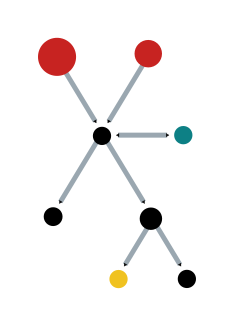
For example, here wind and solar PV nodes are used to generate electricity. The electricity is then directly consumed or used to produce hydrogen:

Note that the node electricity does not represent real technology, but is is used only to create
the network topology. That means, no conversion is done in the electricity node.
To create a network, first create all node objects. Connections between nodes are defined by
passing other nodes via the inputs parameter:
from syfop.network import Network
from syfop.nodes import Node, NodeFixOutput, NodeScalableInput, Storage

# values here are a bit arbitrary but close to real values

wind = NodeScalableInput(
    name="wind",
    input_profile=random_time_series(),
    costs=128 * ureg.EUR / ureg.kW,
)
solar_pv = NodeScalableInput(
    name="solar_pv",
    input_profile=random_time_series(),
    costs=53 * ureg.EUR / ureg.kW,
)
battery = Storage(
    costs=33 * ureg.EUR / ureg.kWh,
    max_charging_speed=0.2,
    storage_loss=0,
    charging_loss=0,
)
electricity = Node(
    name="electricity",
    inputs=[wind, solar_pv],
    input_commodities="electricity",
    costs=0,
    storage=battery,
)
electrolyzer_convert_factor = 0.019 * ureg.kg / ureg.kWh
electrolyzer = Node(
    name="electrolyzer",
    inputs=[electricity],
    input_commodities="electricity",
    size_commodity="hydrogen",
    costs=1 / electrolyzer_convert_factor * 30 * ureg.EUR / ureg.kW,
    convert_factor=electrolyzer_convert_factor,
)
demand = NodeFixOutput(
    name="demand",
    inputs=[electricity],
    input_commodities="electricity",
    output_flow=random_time_series() * ureg.MW,
)

network = Network([wind, solar_pv, electricity, electrolyzer, demand])
Descrete time steps are defined the entire network. In each time stamp a certain amount of each
commodity can flow between two connected nodes. Special node types (NodeFixOutput, NodeFixInput
and NodeScalableInput) can be used to define fixed input or output flows. All other flows are
determined automatically.
For each node costs can be defined. Each node with costs also has a size attribute (the capacity of the technology), which limits the amount of commodities which can flow through the node.
The network is used to generate an optimization model that optimizes the sizes of the nodes and all non-predefined flows between the nodes to minimize total costs. To start the optimization, run:
network.optimize()
The results can be inspected by looking at the solution attribute of the linopy model:
network.model.solution
See the next sections and the API documentation for more details.
Node attributes
Each node has two dictonaries to access input and output flows:
input_flows
output_flows
The keys of these dictionaries are the names of the connected nodes, i.e.
electricity.input_flow["wind"] contains a time series of the electricity flow from the node
wind to the node electricity. The same time series can be accessed via
wind.output_flows["electricity"]. Note that the unit of the flow time series is amount of
commodity per time, i.e. MW or t/h and not MWh or t. (The interval length between time steps is
only considered for storages and input_flow_costs.)
If a node has no input nodes, the input_flows dictionary contains only one item with the key
"". Similarly, if a node has no output nodes, the output_flows dictionary contains only one
item with the key "".
Note that the input_flows and output_flows dictionaries are added to the node objects by the
Network object. Therefore, they are not available before the Network is created.
Each node stores connected nodes in two lists:
inputs
outputs
The commodities flowing over the edges to the connected nodes are stored in two lists:
input_commodities
output_commodities
Note that inputs and outputs are empty lists if no input/output nodes are connected. However,
input_commodities and output_commodities always contain at least one entry to specify the
commodity flowing in entry nodes or out of exit nodes (leaf nodes). Otherwise the length of
inputs and input_commodities are equal and the same for outputs and output_commodities.
If a node has (positive) costs, a size variable is created:
size
The following node attributes are set via parameters in the constructor of the node class:
name
convert_factor
convert_factors
costs
storage
input_proportions
input_flow_costs
size_commodity
See the next sections and the API documentation.
Units
To keep track of units, pint is used for all quantities passed to syfop objects. Pint works seamlessly with numpy arrays and xarray objects:
from syfop.units import ureg

energy = np.linspace(0, 10) * ureg.MWh
power = energy  / (2 * ureg.h)

print(power.to(ureg.kW))
# outputs: [500.0 2000.0 3500.0 5000.0] kilowatt
All user parameters (costs, input_flow_costs, input_profile, input_flow,
output_flow, convert_factor etc.) have to be passed with units. All conversions are done
automatically. pint will raise an error if the dimensions of units are not compatible.
Internally, every quantity will be converted to a unit predefined for each commodity. These units
are defined in syfop.units.default_units and can be overwritten using the parameter units in
the Network object. Solutions in network.model.solution are given in these units.
Use the unit registry in the syfop.units module to add a new unit:
from syfop.units import ureg

ureg.define('USD = 0.93 EUR')
There is more information in the pint documentation on how to define units.